
From PO to Placed Order: An AI Agent in Production
Deepak Kushwaha
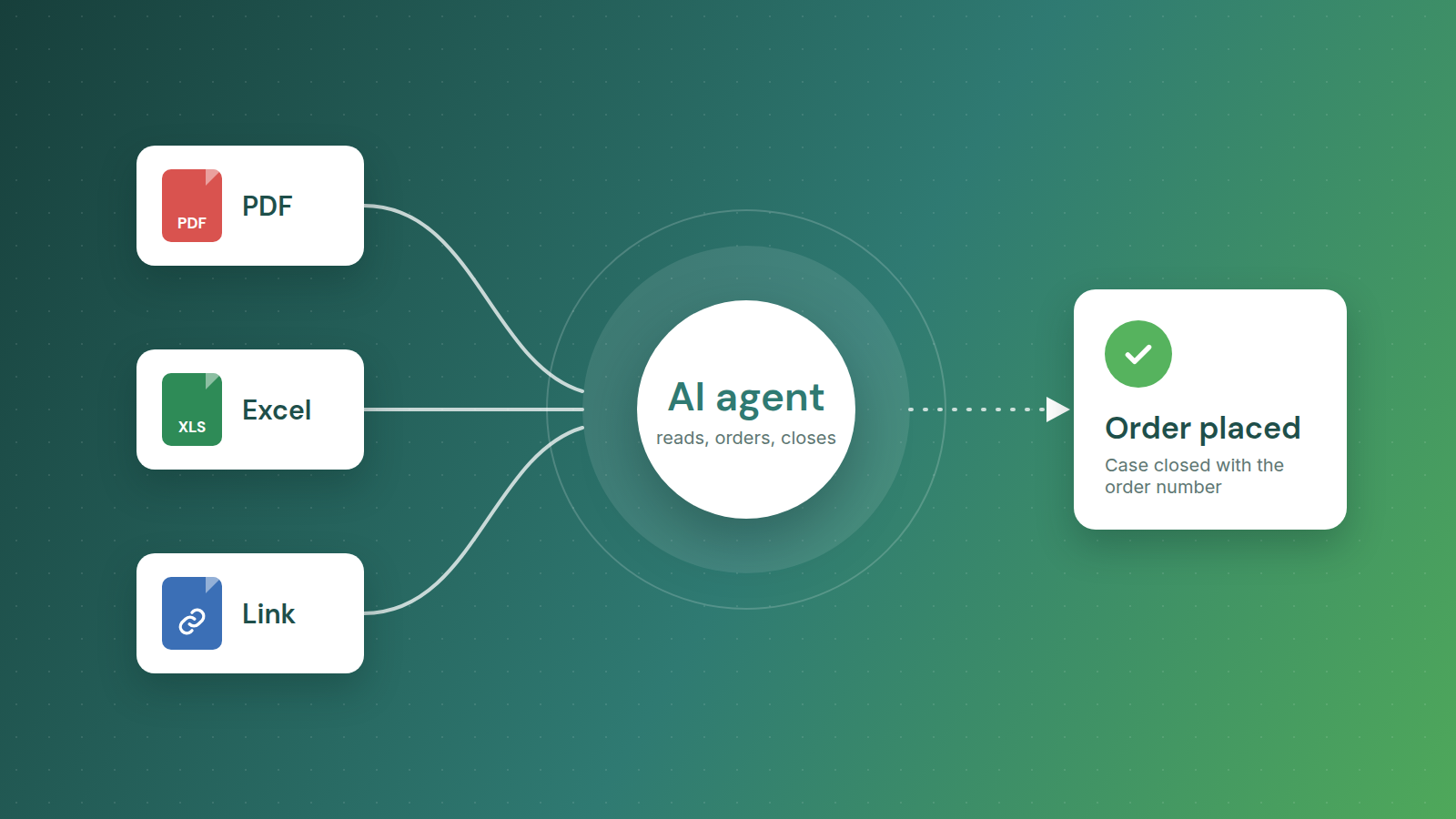
In our last two posts we built an escalation agent that alerts a team in Microsoft Teams when a purchase-order case in Salesforce is escalated. That agent only reads. This time we want to talk about an agent that acts: it reads the purchase order, places the order, and closes the case. Every day, with nobody watching, and with real money on the line.
It is live in production for a medical aesthetics company, running on Amazon Bedrock AgentCore with Claude. This post covers how it works, what broke once it met real traffic, and what it costs.
The problem
Customers send purchase orders as PDF or Excel attachments on Salesforce cases. For each one, a customer-service rep had to:
- open the case and read the document,
- work out which catalogue products the line items refer to,
- log in to the B2B storefront (Salesforce B2B Commerce, CCRZ) on behalf of the customer, build the cart and check out, and
- go back to Salesforce, record the order number and close the case.
That took about 8–10 minutes per case. It was repetitive, easy to get slightly wrong, and it only scaled by adding people. Orders also arrive in spikes, so busy days turned into backlogs.
What one run looks like
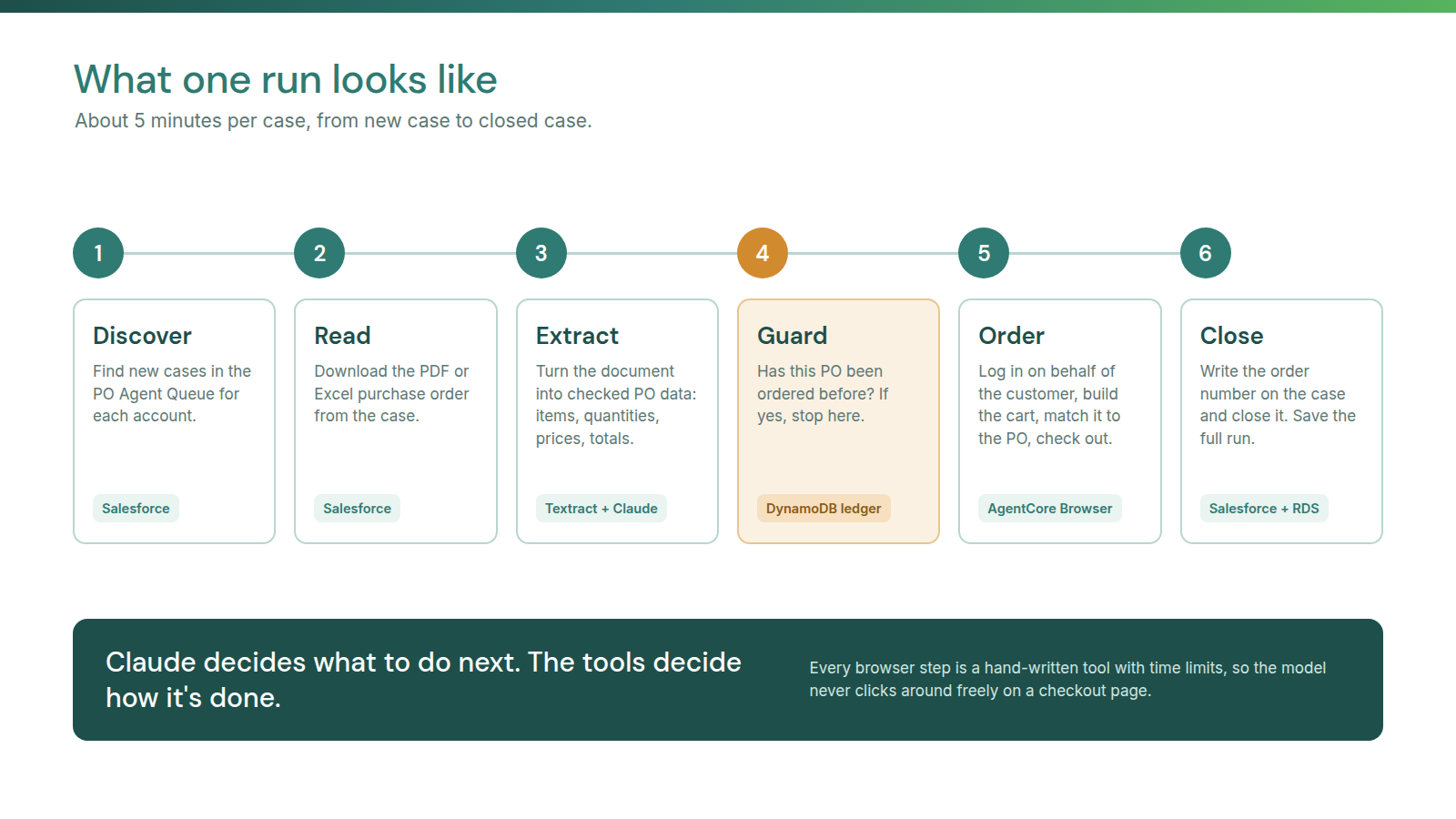
The agent does the same job a person does, in six steps:
- Discover: find new cases in the PO Agent Queue for each account.
- Read: collect the purchase order from the case. It can be a PDF, an Excel sheet, or a link to an outside page.
- Extract: turn the PO into strict purchase-order data: line items, quantities, prices, addresses and totals.
- Guard: check the PO number against a ledger in DynamoDB. If it has already been ordered, stop.
- Order: in a managed Chrome session (AgentCore Browser), log in to the storefront on behalf of the customer, build the cart, check it against the PO totals, and check out to get an order number.
- Close: update the case with the order number, owner, category and status.
An EventBridge schedule starts runs several times a day, and the operations team can also start one by hand.
Every kind of purchase order
Customers don't all send POs the same way, so the agent handles three kinds:
- PDF: Amazon Textract pulls out the text, tables and form fields, and Claude turns them into clean PO data.
- Excel sheets: some customers send one sheet with 40–50 orders in it. The agent works through them one by one and places each as its own order. A sheet like this can keep the agent busy for a few hours, which is why the long-run fixes further down mattered so much.
- Links: sometimes the case has no attachment, only a link to the PO on an outside page. The agent spots this, opens the link in the browser, and scrapes the order details from the page.
All three end in the same place: checked PO data, before anything is ordered.
Logging in, MFA included
The agent signs in to Salesforce in the browser as its own user, with MFA turned on. When Salesforce asks for a verification code, the agent handles both kinds: it reads a one-time code from a controlled email inbox, or it gets the code from an authenticator app, just like a person would with their phone. The login is saved between runs, so most runs don't need to sign in again.
Autoship: orders on a set date
Not every order should be placed right away. Autoship cases are repeat orders that must go out on a scheduled date. The agent reads that date from the case, waits, and places the order on that exact day. It is the third workflow on the platform, next to regular case orders and the PO Agent Queue.
The main design idea: the model decides, the tools act
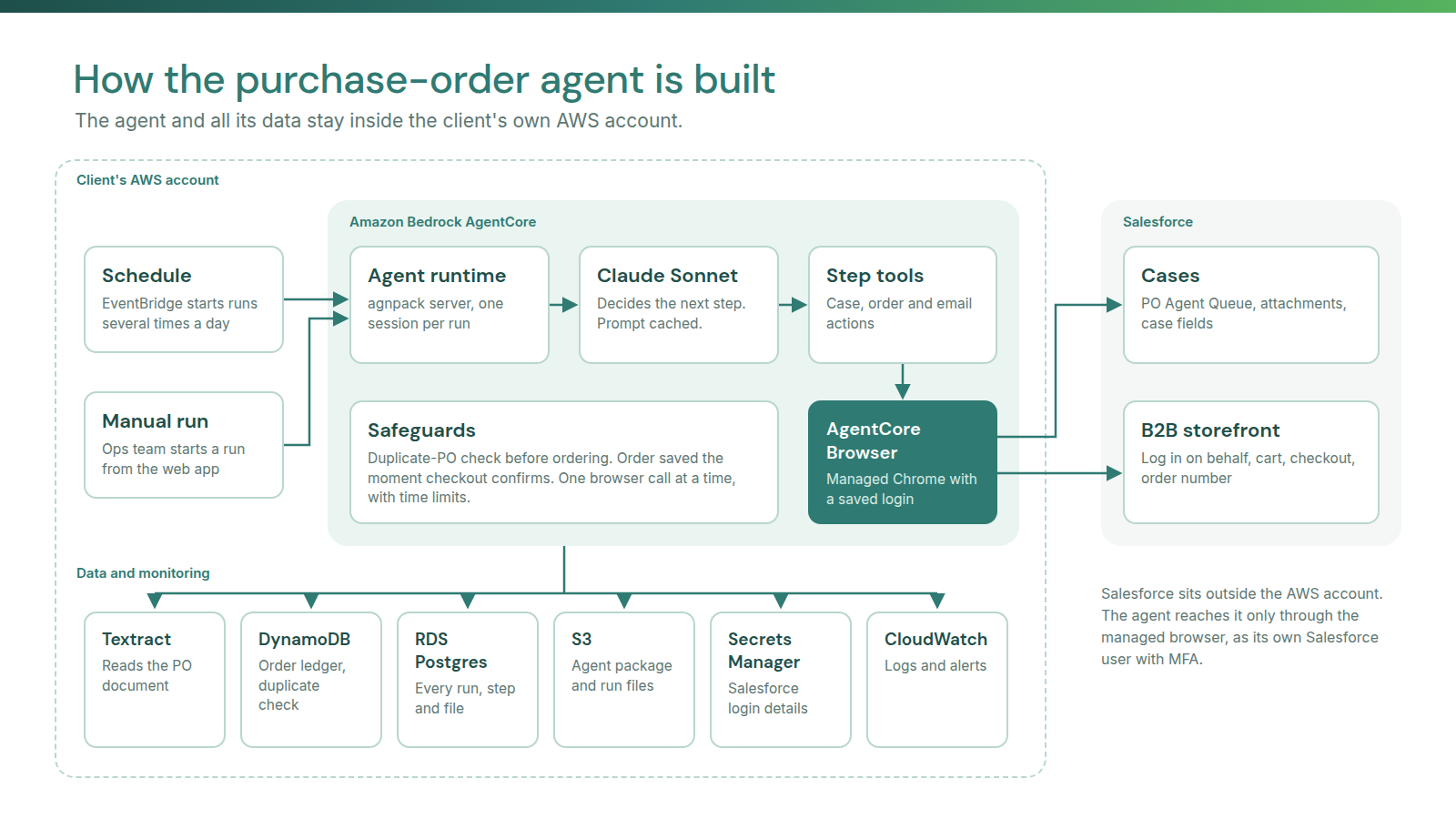
The browser steps (login, open the queue, fill in fields, check out) are hand-written Playwright tools with timeouts and a watchdog. Claude decides what to do next; the tools control how it is done. The model never clicks around freely on a checkout page.
Every model call, tool call and file is saved to a Postgres database, and the run ID is written into each case record. So any order can be traced back to the exact run that placed it.
The agent is built on agnpack, our in-house platform for production agents. The agent, its tools and its workflows are defined in config files instead of being hard-coded. Three workflows already run on it, and adding a new customer account is a reviewed config change, not a rebuild.
What broke in production, and how we fixed it
Getting an agent to work once is easy. Getting it to work every day without anyone watching is the real job. These are the six problems that took the most effort.
1. Runs froze for 28 minutes
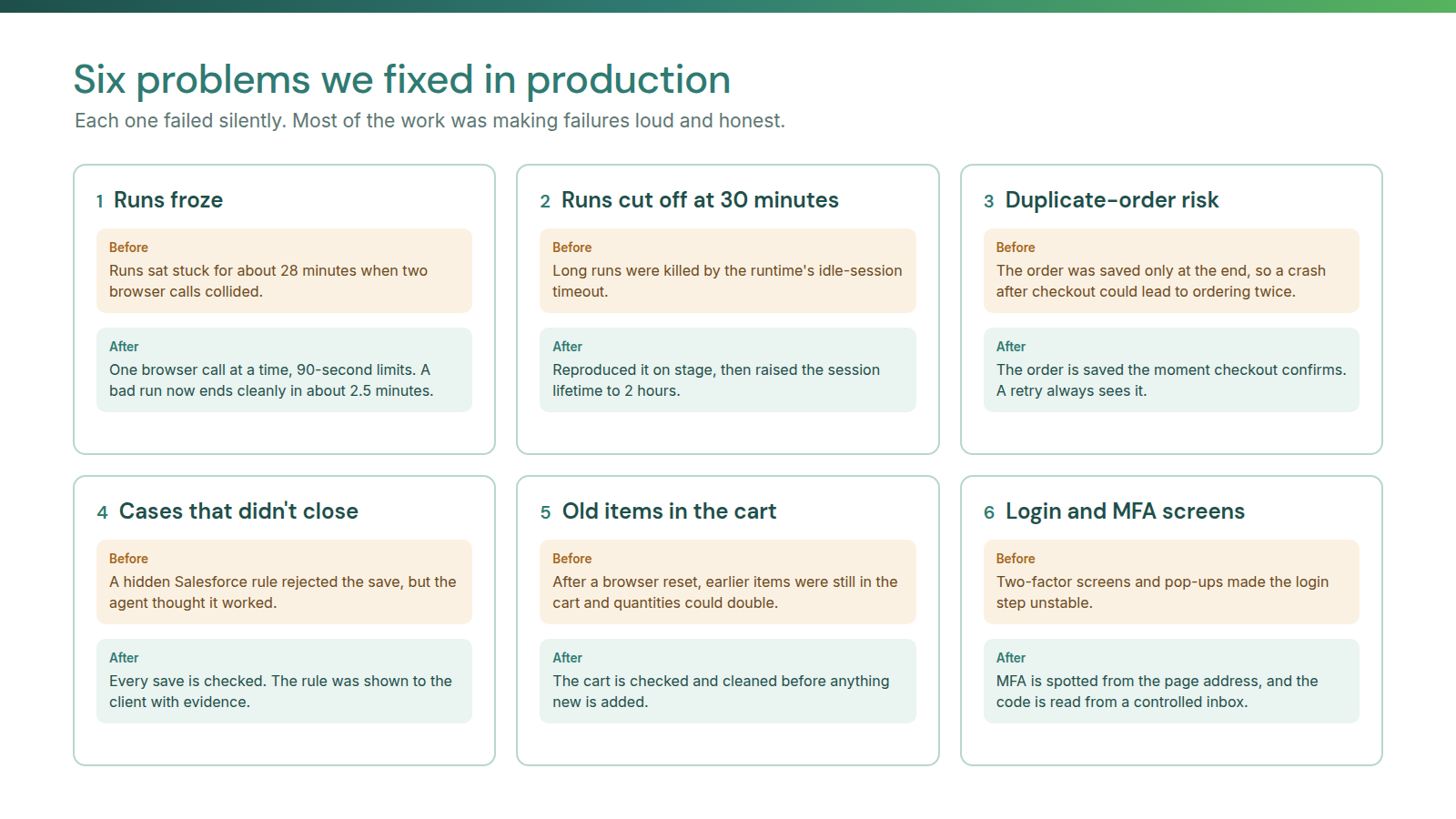
Now and then a run would stop doing anything for about 28 minutes, and sometimes healthy cases were even marked as failed. The cause: a slow browser call hit its timeout, but it was abandoned, not cancelled. It was still running when the next call started, the two collided, and the session got stuck.
Fix: only one browser call at a time (a lock), a 90-second limit on each wait, and a fast stop when the browser session is dead. A stuck run now ends cleanly in about 2.5 minutes.
2. Runs died at exactly 30 minutes
Long runs with several cases were killed in the middle of a model call. The exact number pointed to the runtime's idle-session timeout. We reproduced it on purpose on stage at 1,800 seconds to be sure, then raised the idle timeout to 2 hours.
3. A crash could cause a duplicate order
The PO ledger was written only when the whole case was finished. If a run crashed after checkout but before the case was closed, there was a real order with no record, and a retry would order again.
Fix: write to the ledger the moment checkout confirms. A retry now always sees the order and skips it.
4. Cases that "closed" but stayed open
Some cases looked closed to the agent but were still open in Salesforce, and the screen showed nothing wrong. Looking at the network calls behind the page showed that a validation rule (for example, "a contact is required to close") was rejecting the save.
Fix: after every save, check that it really happened. We also showed the client the exact rule, with evidence.
5. Old items left in the cart
The storefront keeps the cart on the server. If the browser was reset mid-run, items added before the reset were still in the cart, so quantities could double.
Fix: after any recovery, the cart must be checked and cleaned before anything new is added.
6. Login and MFA screens
Two-factor screens, save-password pop-ups and slow first-login pages made the login step unstable.
Fix: detect the MFA screen from the page address instead of reading the whole page. Then get the code the way a person would: from a controlled email inbox, or from an authenticator app linked to the agent's own Salesforce user. MFA stays on. There is no bypass.
One pattern ran through all six: the failure was silent, and the agent thought things were fine. Most of the work was making failures loud and honest.
Results and cost
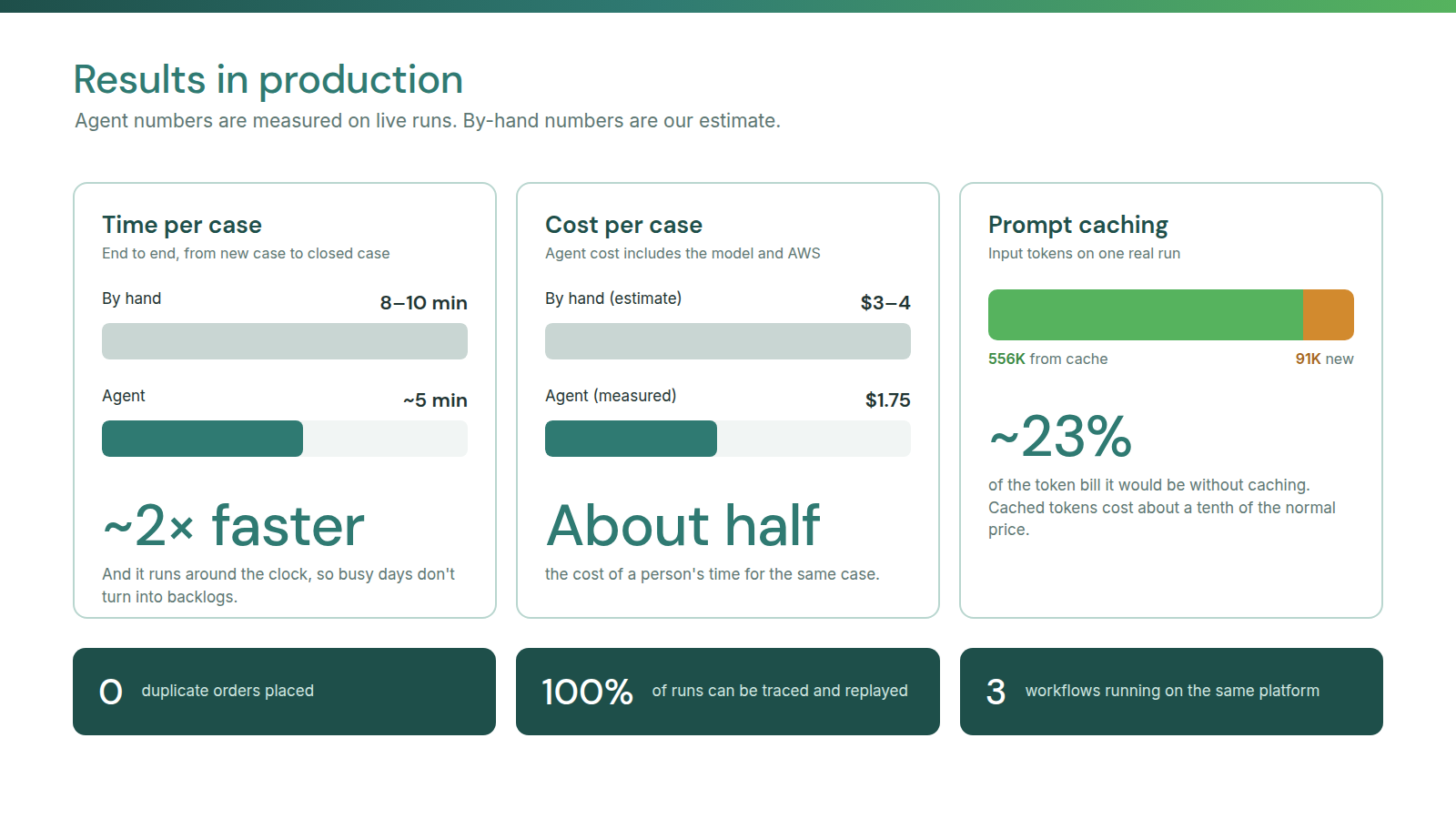
- About 5 minutes per case end to end, compared with 8–10 minutes by hand.
- $1.75 per case, measured, including the model and AWS infrastructure.
- Zero duplicate orders.
- Every run can be traced and replayed.
At typical customer-service rates, 8–10 minutes of a person's time costs roughly $3–4 per case, so the agent is about half the cost. It also runs around the clock and absorbs spikes without a backlog. (The human cost is our rough estimate; the agent cost is measured.)
Prompt caching is the biggest cost lever. The system prompt and tool definitions are the same on every run, so Bedrock serves them from cache at about a tenth of the normal price. On one real run, 556K input tokens came from cache and only 91K were new. That brought the token bill down to about a quarter of what it would have been without caching.
The other savings are simple. POs that were already ordered are skipped before any browsing starts. A dead browser session ends the run in minutes instead of burning time and tokens. And a saved Salesforce login profile means most runs skip the full login.
Security, in short
Everything runs inside the client's own AWS account. Credentials live in AWS Secrets Manager, all AWS access uses short-lived IAM role credentials with no static keys, the runtime runs inside a VPC, and only approved callers can start a run. Secret values are removed before logs are stored. Stage and production are fully separate, so a test can never place a real order. And the riskiest action in the system, placing an order, has the most guards around it.
What's next
Next we are adding more customer accounts on the same platform, supporting more purchase-order layouts so new customers don't have to change how they send POs, and building dashboards on the run history: volumes, turnaround times and exception rates. Longer term, we want to move from browser-first to API-first wherever an API exists, and keep the browser only where it is really needed.